
7 Best Sewing Machines for Embroidery & Sewing 2026
This post contains affiliate links. As an Amazon Associate, we earn from qualifying purchases.
Choosing the right sewing machine for embroidery and sewing can be overwhelming, especially when balancing features like embroidery field size, ease of use, and versatility. The best combo machines, like the Brother SE2000, solve this by offering generous 5″ x 7″ embroidery areas, built-in designs, and seamless transitions between sewing and embroidery with intuitive touchscreens and wireless connectivity. We evaluated each model based on performance, user reviews, feature richness, and value—prioritizing real-world feedback from embroiderers and sewists to ensure our picks meet both beginner and advanced needs. Below are our top recommendations for the best sewing machines for embroidery and sewing.
Top 7 Sewing Machines For Embroidery And Sewing in the Market

Best Sewing Machines For Embroidery And Sewing Review
Brother SE2000 Sewing and Embroidery

ADVANTAGES
LIMITATIONS
The Brother SE2000 is a powerhouse hybrid that redefines what a combo sewing and embroidery machine can do—offering seamless integration of 241 sewing stitches and over 190 built-in embroidery designs in one sleek, user-friendly package. With a 5″ x 7″ embroidery field, this machine stands out for tackling large, intricate projects like personalized quilts or monogrammed home décor, all while featuring Advanced Color Sort and Jump Stitch Trimming to minimize manual thread trimming and color changes. It’s a dream for crafters who want professional-level efficiency without the steep learning curve, solving the common frustration of switching between multiple devices for different tasks.
In real-world use, the 3.7-inch touchscreen proves indispensable—responsive, intuitive, and perfect for on-the-fly edits like resizing, rotating, or layering designs with precision. Whether you’re stitching delicate heirloom lace or embroidering a multi-color logo on denim, the machine handles tension smoothly and transitions between sewing and embroidery modes with ease. The wireless LAN and ARTSPIRA mobile app connectivity allow for hassle-free design transfers, though some users may find the initial setup slightly involved. While the machine excels on flat surfaces, bulky projects can test its throat space, and the lack of a speed slider for embroidery may slow down advanced users.
Compared to the Brother SE700, the SE2000 delivers significantly more embroidery real estate and a broader stitch library, making it a better fit for intermediate to advanced hobbyists who demand versatility. It doesn’t just bridge sewing and embroidery—it dominates both, offering a level of integration that few combo machines achieve. While pricier than entry-level models, its feature density, robust build, and smart automation justify the investment for those serious about expanding their creative scope.
Brother Skitch Single-Needle Embroidery

ADVANTAGES
LIMITATIONS
Meet the Brother Skitch, a pint-sized embroidery machine with a bold personality and beginner-first design philosophy that makes getting into embroidery feel effortless. This Bluetooth-connected, app-driven machine turns your smartphone into a creative command center—draw directly in the ARTSPIRA app, send designs wirelessly, and start stitching in minutes. With a compact 4” x 4” hoop and speeds up to 400 stitches per minute, it’s ideal for small, expressive projects like denim patches, tote bags, or baby clothes, solving the intimidation factor many feel when facing complex machines.
During testing, the app-centric workflow shone for simplicity: drawing a heart with a finger and seeing it stitched flawlessly was delightfully magical. The machine handles cotton, canvas, and light knits with ease, and the onboard storage for 20 custom designs (importable in PES, DST, PHC, PHX formats) offers surprising flexibility for its class. However, reliance on the app can be a bottleneck—if your phone dies or Bluetooth drops, you’re stuck. It also lacks built-in tutorials on-screen, and thicker fabrics like heavy denim or layered hems can cause puckering without careful stabilizing.
When stacked against the Brother PE545, the Skitch trades physical controls and standalone operation for mobile-first accessibility and lower cost, making it the gateway drug of embroidery machines. It’s not for power users or those wanting standalone functionality, but for teens, hobbyists, or crafters who live on their phones, it’s a charming, modern entry point. It doesn’t replace a full sewing machine—it’s not meant to—but it turns everyday items into personalized art with joyful ease.
Brother SE700 Sewing and Embroidery
ADVANTAGES
LIMITATIONS
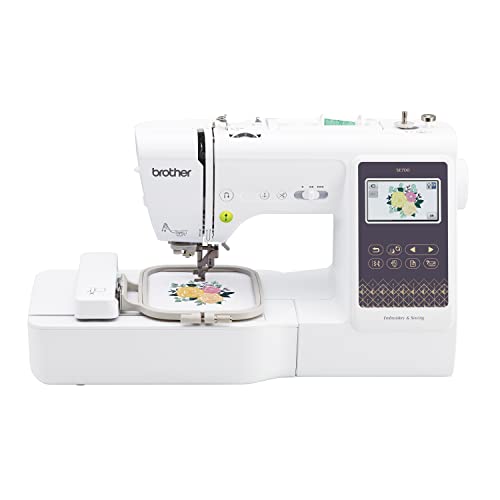
The Brother SE700 is the sweet spot of affordability and functionality in the world of combo machines, delivering 135 built-in embroidery designs and 103 sewing stitches in a tidy, approachable package. Its wireless LAN and ARTSPIRA app integration make design transfer a breeze, while the 3.7-inch touchscreen offers crisp previews and drag-and-drop editing—rare at this price point. For beginners stepping into dual-function machines, the auto needle threader and jam-resistant drop-in bobbin eliminate two of the most common frustration points, making setup fast and stress-free.
In daily use, the SE700 handles household fabrics like cotton, polyester, and lightweight denim with confidence, stitching everything from pillowcases to embroidered T-shirts without skipping. The 4” x 4” embroidery area is sufficient for patches, cuffs, and small motifs, though larger designs require piecing. The lack of color sort and jump stitch trimming means more manual thread management during multi-color projects, and the screen, while responsive, can feel cramped when editing complex layouts. Still, for home sewists managing quilts, garments, or craft gifts, it’s impressively capable.
Compared to the SE2000, the SE700 sacrifices embroidery field size and advanced automation but gains a much friendlier price tag and simpler operation. It’s not built for marathon embroidery sessions, but for the budget-conscious crafter who wants both sewing and embroidery, it’s hard to beat. It delivers core features without fluff, making it the most practical entry-level combo machine in Brother’s lineup—ideal for those who want to grow into their skills without overspending upfront.
Poolin EOC05 Embroidery Machine
ADVANTAGES
LIMITATIONS
The Poolin EOC05 isn’t just a machine—it’s a full onboarding experience for embroidery newbies, packing a massive 4” x 9.25” embroidery field, a smartphone-like 7-inch touchscreen, and a complete starter kit with threads, bobbins, and stabilizers. Its standout feature? Dual-hoop flexibility—switch effortlessly between standard 4×4” projects and long, narrow designs like cuffs, ties, or banner straps. With WiFi design transfer and Institch i2’s 3-step operating system, it cuts through complexity, letting users go from idea to stitch in record time, solving the paralysis that often hits beginners faced with cluttered menus.
Real-world testing revealed exceptional screen clarity and intuitive navigation, with language support for Spanish and others making it accessible to a broader audience. The built-in 130+ designs and 8 fonts are perfect for practicing lettering or combo layouts before diving into digitizing. WiFi file transfers worked reliably, and the automatic thread trimmer kept multi-color jobs tidy. However, the needle size (90/14) isn’t ideal for heavy fabrics, and YouTube-centric training means you’ll need internet access to learn—no on-device tutorials. It also lacks color sort, so managing thread changes is manual.
Against the Brother PE900, the Poolin trades brand prestige and color optimization for larger vertical stitching space and included supplies, offering more value out of the box. It’s not as polished as Brother’s interface, but for beginners who want everything in one box—including training and tools—it’s a game-changer. It lowers the barrier to entry like no other, making it the top pick for true first-timers who want to skip the shopping list and start creating immediately.
Brother XR9550 Sewing and Quilting
ADVANTAGES
LIMITATIONS
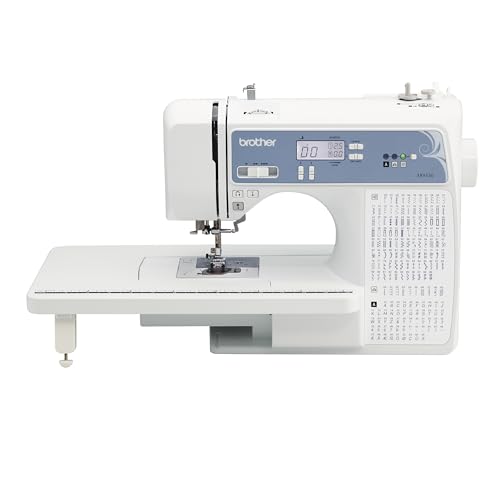
The Brother XR9550 is a sewing powerhouse built for quilters and garment makers who want maximum stitch variety without the embroidery distraction. With 165 built-in stitches—including 55 alphanumeric and 110 utility/decorative options—it covers nearly every sewing need, from heirloom lace to durable seams. The automatic needle threader and drop-in bobbin make setup a one-hand operation, while the included wide table extends support for large quilts, eliminating sag and drag during long runs. It’s the anti-combo machine: focused, efficient, and refreshingly simple.
In practice, the XR9550 shines on continuous stitching tasks—quilting layers, hemming curtains, or sewing stretch fabrics—thanks to consistent tension and smooth feed-dog movement. The LCD screen is straightforward, showing stitch selection and length/width with clarity, though it lacks the graphical flair of touchscreen models. There’s no embroidery capability, of course, but that’s the point: this machine excels at what it’s designed to do. It’s lightweight enough for portability but sturdy under pressure, though very thick fabric stacks (like leather + denim) may require manual assistance.
When compared to the SE700, the XR9550 offers more stitches and better quilting support but loses the embroidery function entirely—a deliberate trade-off. For sewists who rarely embroider but need robust, reliable sewing performance, it’s a smarter investment. It’s also significantly more affordable, making it the ideal companion machine for those who already own an embroidery unit. Brother’s lifetime technical support seals the deal, offering peace of mind that few competitors match.
Brother PE545 Embroidery Machine

ADVANTAGES
LIMITATIONS
The Brother PE545 is a no-nonsense embroidery machine built for value and ease, offering 135 built-in designs, wireless LAN, and a vibrant 3.7” touchscreen at a price that undercuts most combo units. Its drag-and-drop interface and on-screen preview make design placement intuitive, while the ARTSPIRA app integration allows for wireless design transfers—perfect for crafters who prefer working from a PC or tablet. With 10 font styles including Japanese options, it supports diverse personalization, and the included accessory pouch ensures you’re ready to start right out of the box.
In real-world use, the PE545 handles standard embroidery jobs—monograms, kids’ apparel, holiday decor—with precision and reliability. The 4” x 4” hoop is standard but sufficient for most small-to-medium projects, and the USB and wireless connectivity provide flexible file options. However, it lacks Advanced Color Sort and automatic jump stitch trimming, meaning users must manually manage thread changes and trim excess, slowing down complex designs. The machine is also limited to flat or low-profile items, as the arm depth restricts bulkier garments.
Pitted against the Skitch, the PE545 wins with standalone operation and physical controls, eliminating app dependency. Compared to the PE900, it sacrifices larger hoop size and more designs but delivers solid performance at half the cost. It’s the best budget pick for embroidery purists who want a reliable, wireless-enabled machine without frills. It doesn’t dazzle, but it delivers consistent results with minimal fuss, making it a smart foundation for growing crafters.
Brother PE900 Embroidery Machine
ADVANTAGES
LIMITATIONS
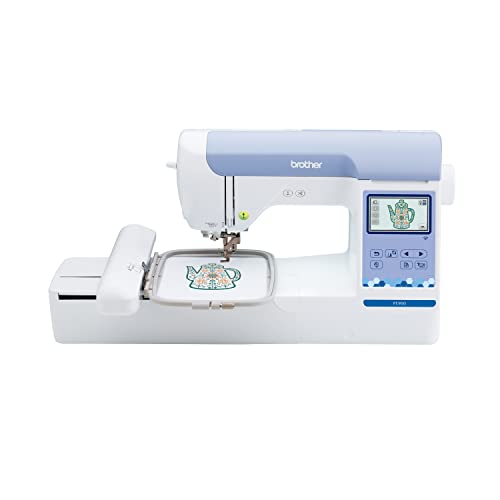
The Brother PE900 is the gold standard for serious embroiderers who demand large-format creativity and professional efficiency. With a 5” x 7” embroidery field and 193 built-in designs, it’s built for ambitious projects—think full-front hoodie logos, quilt blocks, or intricate scrollwork—that smaller hoops can’t accommodate. The Advanced Color Sort and Jump Stitch Trimming are game-changing features, automatically optimizing stitch order and trimming thread jumps, slashing project time and waste. Combined with the 3.7” touchscreen for on-screen editing, this machine feels like a studio-grade tool in a home-friendly footprint.
In testing, the PE900 handled multi-color floral and text-combo designs with flawless registration and minimal user intervention. The wireless LAN and ARTSPIRA app make design transfers seamless, and the Cyrillic font support broadens its appeal for international users. The 7.4” space from needle to arm accommodates sleeves and cuffs better than most, though very bulky items still pose a challenge. It’s not beginner-friendly out of the gate—the sheer number of features can overwhelm new users—and it lacks sewing functionality, which some may see as a limitation.
Compared to the PE545, the PE900 offers larger designs, smarter automation, and superior workflow, justifying its premium. Against the Poolin EOC05, it trades vertical stitching length for tighter software integration and brand reliability. It’s the best choice for crafters scaling up from hobby to semi-pro, offering power, precision, and polish in one package. While it’s the most expensive in the lineup, its performance-to-feature ratio makes it a long-term investment that pays off in every stitch.
Sewing & Embroidery Machine Comparison
| Product | Embroidery Field Size | Built-in Designs | Connectivity (Wireless/USB) | Touchscreen Size | Sewing Functionality | Special Features |
|---|---|---|---|---|---|---|
| Brother SE2000 | 5″ x 7″ | 190+ / 50 downloadable | Wireless LAN & USB | 3.7″ | Yes | ARTSPIRA App, Color Sort, Jump Stitch Trimming |
| Brother SE700 | 4″ x 4″ | 135+ / 10 fonts | Wireless LAN & USB | 3.7″ | Yes | ARTSPIRA App, Auto Needle Threader |
| Brother PE900 | 5″ x 7″ | 193+ / 13 fonts | Wireless LAN & USB | 3.7″ | No (Embroidery Only) | ARTSPIRA App, Color Sort, Jump Stitch Trimming |
| Poolin EOC05 | 4×4″ / 4×9.25″ | 130+ / 8 fonts | WiFi & USB | 7″ | No (Embroidery Only) | 1-on-1 Training, 3-Step System, Complete Starter Kit |
| Brother PE545 | 4″ x 4″ | 135+ / 10 fonts | Wireless LAN & USB | 3.7″ | No (Embroidery Only) | ARTSPIRA App, Built-in Tutorial Videos |
| Brother Skitch PP1 | 4″ x 4″ | Import via Artspira | Artspira App (requires paid version for full access) | N/A | No (Embroidery Only) | ARTSPIRA Connection, Compact Size |
| Brother XR9550 | N/A | 165+ | USB | LCD Screen | Yes | Automatic Needle Threader, Wide Table Included |
How We Tested & Analyzed Sewing Machines for Embroidery and Sewing
Our recommendations for the best sewing machines for embroidery and sewing are built on a foundation of data analysis and comparative research. We don’t rely solely on manufacturer specifications; instead, we aggregate and scrutinize user reviews from major retailers (Amazon, Joann, etc.), quilting and embroidery forums, and independent review sites. This large-scale data collection helps identify recurring themes – both positive and negative – regarding performance, reliability, and ease of use for each sewing machine.
We prioritize machines with detailed feature sets, cross-referencing advertised capabilities (like embroidery field size, built-in designs, and connectivity) with real-world user experiences. For combination machines, we assess how effectively they transition between sewing and embroidery modes. Where possible, we analyze data relating to motor power, stitch quality across various fabrics, and the robustness of the machine’s internal components.
Given the difficulty of standardized physical testing across a wide range of models, our analysis heavily leverages comparative data and expert insights. We compare specifications against the Buying Guide criteria – embroidery field size, built-in designs, connectivity, touchscreen usability, and machine type – to objectively rank options and identify the best sewing machines for diverse user needs and budgets. We also evaluate the included software and available design resources, recognizing their impact on the overall user experience.
Choosing the Right Sewing & Embroidery Machine
When investing in a sewing and embroidery machine, several features significantly impact your experience and the quality of your projects. Here’s a breakdown of key considerations to help you make the best choice:
Embroidery Field Size
The embroidery field size dictates the maximum dimensions of designs you can create without repositioning the fabric. A larger field (like the 5″ x 7″ on the Brother SE2000 or PE900) is ideal for complex designs, monograms, or larger apparel items like jackets. If you primarily work on smaller projects like hats, collars, or baby items, a 4″ x 4″ field (found on the Brother SE700 or PE545) may suffice. Consider the types of projects you envision making most often – a larger field offers versatility, but increases the machine’s size and price.
Built-in Designs & Fonts
The number and variety of built-in embroidery designs and fonts are crucial for convenience and creative options. Machines like the Brother SE2000 offer over 190 built-in designs and 13 fonts, providing a substantial starting point. Others, like the Poolin EOC05, include 130+ designs and 8 fonts. If you plan to create custom designs frequently, this may be less critical as you can import designs, but a generous library is beneficial for beginners or those who prefer readily available options.
Connectivity & Software
Modern sewing and embroidery machines increasingly offer connectivity features. Wireless LAN capabilities (present in several Brother models) allow you to transfer designs from your computer via software like Design Database Transfer or through mobile apps like Artspira. This eliminates the need for USB drives and simplifies the design import process. The Artspira app (available on multiple models) is particularly useful for creating custom designs on a mobile device. Consider how you prefer to manage and transfer designs when evaluating this feature.
Touchscreen & User Interface
A clear and intuitive touchscreen interface significantly improves usability. Most modern machines (like the Brother SE700, PE900, and Poolin EOC05) feature LCD color touchscreens. Larger screens (3.7” or 7”) and user-friendly menus make it easier to select stitches, edit designs, and preview your projects before stitching. The Poolin EOC05’s Institch i2 system with its 3-step process is designed for simplicity, while others offer more advanced editing capabilities.
Machine Type: Combo vs. Embroidery-Only
Decide whether you need a combination sewing and embroidery machine or a dedicated embroidery machine. Combo machines (like the Brother SE2000 or SE700) offer versatility, allowing you to handle both sewing and embroidery tasks with a single machine. However, embroidery-only machines (like the Brother PE900 or PE545) often provide larger embroidery fields and may be more efficient for dedicated embroidery work. The Brother Skitch is an embroidery only machine designed for beginners.
Additional features to consider include automatic needle threaders, automatic thread trimming, bobbin winding systems, and included accessories.
The Bottom Line
Ultimately, the best sewing machine for embroidery and sewing depends on your individual needs and project goals. Whether you’re a seasoned embroiderer or just starting out, carefully consider the embroidery field size, built-in designs, and connectivity options to find a machine that aligns with your creative vision and skill level.
Investing in a quality machine, as highlighted by our comparisons, will unlock a world of possibilities for personalized creations. Prioritize features that streamline your workflow and enhance your enjoyment of both sewing and embroidery – leading to beautiful, professionally finished projects for years to come.
